Posts

How to implement Cross-Site In-Session Sitecore Analytics

Image
I came across this weird scenario wherein we were migrating old legacy project coded in Vb.net into Sitecore. So during this process, we had to migrate in a prioritized manner which made difficult to share analytics across two different projects. So I have just noted down what I did in order to accomplish the same. Assume we have a scenario with two different projects which are utilized for same Website (Some pages in Sitecore and Some pages in any other framework ). Let's Assume Sitecore Project named as " CodeYourWaySitecore " and other project named as  " CodeYourWayLegacy " For  CodeYourWaySitecore  and  CodeYourWayLegacy  (“ CodeYourWayLegacy.demo.com ” and “ CodeYourWayLegacy.demo.com ”)  are hosted on different websites.   By default in session, analytics work for each individual site.  Identifying and merging contacts at the end of the session allows for post-session interactions(assuming the contacts have ...
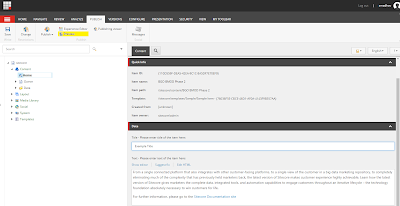
How to Preview an Item in Sitecore CMS

Image
The preview functionality within Sitecore can be a useful tool when viewing pages on your website regardless of published status. Using preview allows you to: View the past or future version of your website based on a specified preview date and publishing restrictions. View a webpage in different language versions. View how a web page appears on various devices. A Note on Sitecore Preview : Pages may not always appear correctly within Sitecore Preview. Keep in mind that previewing will display page content regardless of publish status. This encompasses all associated items, including media. Preview From the Content Editor If you’re in Sitecore’s Content Editor, you can open Preview by first selecting a web page item that you would like to preview and then click “Preview” within the Publish group on the Publish tab. Sitecore Preview from Content Editor A preview of the page item will open in a new tab. Sitecore page Preview  Alternatively, the pre...

Handle Divide-By-Zero Error In SQL

Image
The idea here is that, as with any other form of math that we know of, we cannot divide by zero in a SQL call. Therefore, running this code : SELECT ( 3765 / 0 ) AS value ; if  you ever tried this , result of SQL server would be  : To prevent this sort of error from being thrown, author Hugo Kornelis suggests using a NULLIF () in the divisor of the equation. NULLIF () takes two arguments and returns NULL if the two values are the same and can be used to turn the divisor from a zero into a NULL which, in turn, will force the entire equation to become NULL .  SELECT ( 3765/ NULLIF( 0, 0 ) ) AS value ; Therefore, while we try running modified query (as above) , we would end up getting Null Object , which reduces the risk of handling divide by zero : NULLIF(0,0) returns NULL since zero is equal to zero , which makes SQL statement to return NULL . Till this point its pointless example since both zero values are hard coded . But imagine if...

AngularJs -Effective way to Monitor Changes to Model data

Image
The two-way data binding in AngularJS is very powerful, especially when there is a direct mapping of input data to view-model-data. But, when the data mapping requires some translation, interpretation, or validation, you need to get your hands a little dirty - you need to get more involved in how data changes are propagated within your Controller(s). As this has happened to me, I've been forced to think more deeply about my AngularJS application architecture; and, as a result, I've found that my life is often simplified (in the long term) by calling a directive to watch before I bind the data to View model. Factory To Monitor Changes This is easiest and effective way because of these reasons : 1) I just need to call a Trigger Method with scope which should be monitored 2) Once the data is retrieved from Ajax call , I just Initialize the data 3) If there are any changes to bound data on the form and user tries to navigate to another page, I get Confirm box on the...

C# 7.0 Potential Features – Local Functions

Image
Thoughts on C# 7.0 Local Functions. Potential Features - Local Functions Frankly, when I first tried this, I thought that it's just a nice and compact way of defining local helpers. In fact, it's much more interesting and useful feature. Today I'm going to explore and explain it in more details. Let's  start with a brief overview of the current situation. Before Local Functions Private methods The first option that existed in C# 1 is having a private method. That’s a clean and simple solution. It has few issues, though. PrintMe might have no sense outside of ThatTime method, but it’s accessible for every other method inside the class. It will be taken into account by IntelliSense. Func and Action We can try to hide our helper inside the scope of ThatTime method by converting it to Func<int, string>: Any disadvantages ?? Yep, a lot. The call is unnecessary expensive: it will produce  more ...

Make it Easy by Angular-JS Directive to Format or Filter Date

Image
There is always a havoc on handling dates in the application either it's java /dot net or angular . So here is the best way I found in order to overcome the problem . Date Directive Here I am going to explain about angular date filtering concept and how to  use filtering concept to filter Date across your application.It is always better to create a date.js file for those filtering concept.  The advantage of this is you can very easily filter the data anywhere in your view by just placing directive. This can be achieved by using following code in your module defined, for example : CYW.date below. angular.module('CYW.date', []) .filter('stringToDate', function () { return function (input) { /// gets Date input, if not, returns null. Also sets the date to /// correct format if (!input) return null; var date = moment(input); return date.isValid() ? date.format('MM/DD/YYYY') : null; }; }...

C# 7.0 Potential Features – Tuples

Image
In this article, let's discuss on Tuple Class in C# and the potential new proposals that are being considered for C#7. Potential Features - Tuple What is Tuple in C#? Basically, a  tuple  ( Tuple in C# ) is an ordered sequence, immutable, fixed-size and of heterogeneous objects, i.e., each object being of a specific type. The  tuples  are not new in programming. They are already used in F#, Python, and databases. A tuple allows you to combine multiple values of possibly different types into a single object without having to create a custom class. This can be useful if you want to write a method that for example returns three related values but you don’t want to create a new class. System.Tuples namespace supports Tuple class in C#. The purpose of a tuple is to create a way to return multiple values from a function. class CodeYourWayTupleDemo { static void Main() { // Create three-item tuple. Tuple tuple = new Tuple ...

Read CSV file content using Angular Directive.

Image
This demo shows how to read a CSV file and get its content into scope by using angular . Let's consider the view where we will be having Upload control and that's very simple code . Below would be the HTML file. If you notice the  accept   attribute on file upload control above forces the browser to accept files type  .CSV  but again user can change it anytime and select another file . Have a validation for file type if you want to restrict to CSV only  Now Let's define the Controller File which reads the input type .  For Demo Purpose I am just copying all contents into scope .Choose your implementations according to Your need !!  Result of Code  : CodeYourWay Page

Some of the time-saving tips every AngularJS user should know !! - Part 2

Image
Must Read  before Reading this Post : Some of the time-saving tips every AngularJS user should know !! - Part 1  . As Discussed in Earlier post  ,It was all about High/Architecture level Tips . Let's go through some Low-Level thoughts. At a Low-Level Thoughts/Tips/Gotchas: 1) Learn and love your console logs - Sometimes, especially with the digest cycles and angular lifecycle, it's sometimes easier to print your debugs to a console.logs instead of adding breakpoints. It's faster! 2) Get Batarang  , the chrome extension -   That is by far the best way to get into the bowels of AngularJS, and some of the details it provides (performance, dependencies) will make your life super simple and easy 3) Start running your unit tests on every save -   It will do the work of the compiler, and next time you break any functionality, you can fix it with a simple Undo in your IDE 4) Use the [] notation for listing your dependencies -...